ripbi deps: explore dependencies
Use deps after a scan to see what an object depends on and what would be
affected if it changed. These examples run from the root of a clone of this
repository and use the committed AdventureWorks model:
ripbi deps "'Sales'[Sales]" --model "samples/AdventureWorks Sales.SemanticModel"
ripbi deps "'Sales'[Sales]" --model "samples/AdventureWorks Sales.SemanticModel" --impact --depth 1
ripbi deps --model "samples/AdventureWorks Sales.SemanticModel" --table Sales
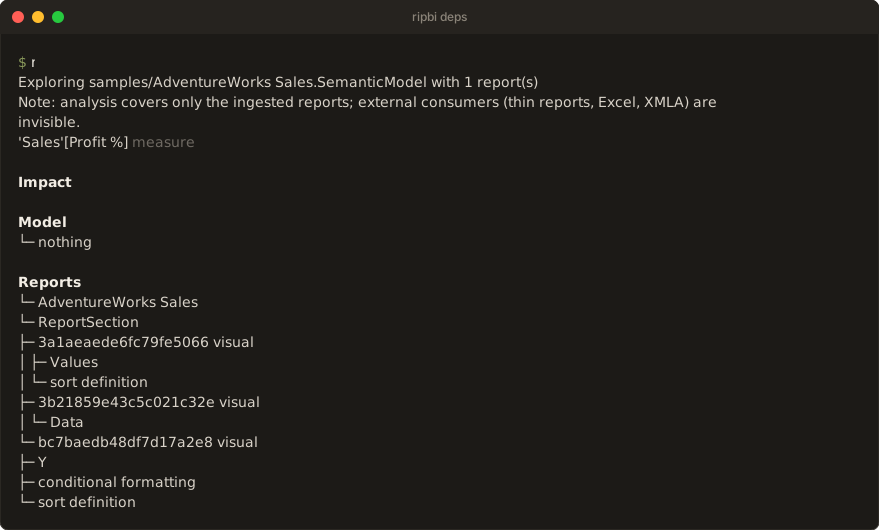
The default view shows dependencies above impact. Dependencies are what the
object uses; impact is what uses it, including report bindings when reports
are connected. --model also works without reports for model-only exploration.
An empty impact is a valid result, not an error.
The rest of this page is the detailed reference for lookup, filters, output formats, and exit codes.
Command forms
ripbi deps [OBJECT] [flags]
ripbi deps --table NAME [flags]
ripbi deps --type TYPE [flags]
ripbi deps [OBJECT] --model PATH [--report PATH]... [flags]
ripbi deps [OBJECT] --queries-from LOG [flags]
OBJECT is the only positional operand — the one deliberate exception to the
flags-over-positionals preference, because deps has one natural subject. A filesystem
path is never inferred from it: model and report inputs arrive only through --model
and --report.
Model and report inputs
The target ladder is scan's: --model PATH first, else the ripbi.toml target, else
derivation from the --report anchors alone (every anchor must pair with the same
model), else current-directory discovery (one candidate announced, several prompt with
the numbered picker on a TTY stdin, none is an error). --report PATH (repeatable) adds
reports as binding sources the same way scan takes them, search folders included; a
.pbip value expands to its project's reports.
One deliberate difference from scan: a model with no reports is valid. There is no
zero-connected-report refusal and no --allow-no-reports — liveness is not the
question here, and the intra-model dependency graph is fully explorable without any
report. The announce line says so: Exploring X with no reports.
Streams
| Content | Stream | Notes |
|---|---|---|
| The view: focused trees, diagrams, overview, JSON, plain records | stdout | the machine-readable side |
| Discovery/selection announce, exploring line | stderr | one line each; the exploring line counts the paired reports (--verbose names them) |
Pairing notes (Note: by-name matches, Ignored … bound to other models) | stderr | capped lines, as in scan |
| Coverage caveat | stderr | once per run |
| Skip notices (parser drift, stale saved state, unresolved dataset references) | stderr | grouped under one header, in every mode — the JSON documents the graph, not the run |
| Errors + hints | stderr | error: … / hint: … |
-q/--quiet suppresses everything on both streams; the exit code is the only output.
Object lookup
References are resolved by the shared lookup in ripbi-core, so ambiguity rules and
suggestions behave the same here as in any future command. Accepted forms:
- member shorthands:
'Sales'[Sales],Sales[Sales]— match every member kind in the named table (column, measure, hierarchy, calculation item); - an unqualified
[Name]— matches the global measure of that name, every table's member of that name, and report measures; - bare names — the global namespaces only: tables, measures, shared expressions,
functions (so the issue's
"Sales"matching both the table and its same-named measure is ambiguity, never a guess); - every object's full display form —
table 'Sales',hierarchy 'Date'[Calendar],partition 'Sales'[Sales],relationship 'Sales'[Key] -> 'Dim Old'[Key]— is matchable verbatim, covering the kinds no shorthand addresses.
Ambiguity is never resolved silently:
error: "Sales" matches multiple objects

  table    'Sales'
  measure  'Sales'[Sales]

hint: use a fully-qualified object reference, e.g. 'Table'[Name]
A reference matching nothing offers the nearest object by edit distance:
error: object "'Sales'[Totla]" was not found

Did you mean:
  'Sales'[Total]
hint: object names are case-insensitive; quote the table: 'Table'[Name]
Direction
--dependencies shows what the object relies on; --impact shows what relies on it.
Neither flag — or both — shows the default view with both sections. Impact splits into
Model (consuming model objects), Reports (the bindings riding on the impact
slice), and Kept (the objects on the impact slice a ripbi_keep model annotation
keeps, issue #151); an impact with none of them prints └─ nothing and still exits
0.
Queried follows Kept when a workspace-monitoring query log is in play (see
Logged queries).
Kept answers "why is this alive?" when no report is the reason. Each kept object
prints the annotation's reason — prefixed with the object unless it is the one asked
about, naming the kept table when the annotation sits on the table:
'Sales'[Legacy]  column

Impact

Model
└─ 'Sales'[Legacy Total]  measure

Kept
└─ 'Sales'[Legacy Total]  kept: Used by the Finance Excel pivot (FIN-231)
An empty reason reads kept (no reason given); a member of a kept table reads
kept by table 'Archive': …. The consumer and report filters leave Kept out: an
annotation is neither a visual, a model object, nor in a report.
Logged queries
--queries-from PATH (or queries_from in ripbi.toml) reads an export of
workspace monitoring's SemanticModelLogs QueryEnd events — the formats, the KQL
to export them, and the resolution rules are in
output.md. Each object on the impact
slice that a logged query names directly gets a Queried line: how many queries, by
how many distinct users (never who), the last day seen, the client applications, and
how many distinct reports the queries came from.
'Sales'[Legacy]  column

Impact

Model
└─ 'Sales'[Legacy Total]  measure

Queried
└─ 'Sales'[Legacy Total]  queried 2× by 1 user · last 2026-09-30 · Excel
The line is prefixed with the object unless it is the one asked about. Like Kept,
the consumer and report filters leave Queried out: a logged query is neither a
visual, a model object, nor in an ingested report. A log's report ids are service
GUIDs, which no local report file carries, so they are counted, not matched to the
Reports section.
Depth
--depth N traverses at most N edges from each root (minimum edge distance);
--depth all — the default — traverses to the leaves. --depth 0 is a usage error,
not a silent empty view.
Selection
--table NAME roots every member of one table; --type TYPE roots every object of one
kind (repeatable). Both together intersect: the members of the table with the kind.
Selectors choose where exploration starts — they never restrict what traversal reaches,
so a Sales root may reach 'Exchange Rates'[Rate]. An unknown --type lists the
vocabulary (table, column, measure, hierarchy, partition, relationship,
role, calculation_item, expression, function, report_measure, bookmark);
bookmark selects fully stale bookmarks only; a selector
matching nothing is an error.
Filters
Traversal always runs at full depth; the filters restrict which results are included, keeping exactly the branches that lead to a match:
--consumer TYPEkeeps downstream usages by that kind of consumer.visualhands the view to the report bindings (the Model section steps aside); a model kind prunes the impact tree and drops bindings — a binding is a visual's usage, not a measure's.--in-report NAMEand--on-page NAMEfilter the report bindings by folded name. A binding whose site is unnamed never passes a filter it cannot be checked against.
Asking for a filter with --dependencies alone is a contradiction, not a silent no-op:
the run fails with a hint.
Human output
The focused view prints the object, its kind, and one tree section per active direction:
'Sales'[Total]  measure

Dependencies
├─ table 'Sales'  table
│  └─ partition 'Sales'[Sales]  partition
└─ 'Sales'[Amount]  column
   └─ table 'Sales'  table  ↩ already shown

Impact

Model
└─ nothing

Reports
└─ Mini
   └─ P1
      └─ V1  visual
         └─ Values
The projection rules: a node on the current path prints ↺ cycle; a node expanded
anywhere earlier prints ↩ already shown instead of duplicating its subtree; children
are identity-sorted. Meaning never depends on colour — the markers are characters, and
the TTY/CLICOLOR_FORCE/NO_COLOR/TERM=dumb/--no-color rules are scan's.
When the tree would flood the terminal, the human view stops expanding at a fixed
budget, marks each cut branch with … N additional branches, and closes with the
reachable count and pointers at --depth, --graph, and --json. --plain and
--json never truncate.
With no object and no selectors the command prints the compact overview — never the whole graph:
Dependency graph

6 model objects
7 dependency edges
1 report bindings

By type
  Measures      2
  Columns       2
  Hierarchies   0
  Relationships 0
  Other         2

Try:
  ripbi deps "'Table'[Name]"
  ripbi deps --table Sales
  ripbi deps --type measure
--graph draws each root's slices as a layered topology diagram instead of a tree:
layers are BFS distances from the root, arrowheads point at the used side (away from
the root for dependencies, back at it for impact). Cycles and long jumps stay unrouted
— the tree and machine modes show them exactly. Past 24 nodes the diagram degrades to
a numbered legend rather than unreadable output.
--plain
One typed record per line, tab-separated, for grep/cut/awk. Never truncated.
dependency	'Sales'[Total]	'Sales'[Amount]	measure_expression
impact	'Sales'[Total]	'Sales'[Margin Color]	measure_expression
binding	'Sales'[Total]	Mini	P1	V1	Values
kept	'Sales'[Legacy Total]	'Sales'[Legacy Total]	Used by the Finance Excel pivot
queried	'Sales'[Legacy Total]	2	2026-09-30 09:45:00.0000000	1	Excel
dependency— graph orientation: consumer, what it uses, provenance key.impact— the queried-object side first, then what uses it.binding— object, report, page, visual, and the binding role (Values) or machine kind (filter,sort,drillthrough,conditional_formatting,alt_text);-for an absent level.kept— the kept object on the impact slice, the annotated object (itself, or its kept table), and the reason, with tabs and line breaks inside it turned into spaces.queried— an object on the impact slice logged queries name, the query count, the last timestamp as exported (-when absent), the distinct user count, and the comma-joined client applications (-when none).
Selector runs merge their roots' slices and drop duplicate records. The overview prints
count records instead (objects, edges, bindings, then one type count line per
bucket).
ripbi deps "'Sales'[Total]" --plain | cut -f1
ripbi deps "'Sales'[Total]" --plain --impact | grep $'\tvisual_binding'
--json
The graph itself, not either presentation — schema_version 1, pretty-printed with a
trailing newline. Never truncated.
{
  "schema_version": 1,
  "root": { "id": "'Sales'[Total]", "type": "measure" },
  "nodes": [ { "id": "'Sales'[Amount]", "type": "column" } ],
  "edges": [
    {
      "from": "'Sales'[Total]",
      "to": "'Sales'[Amount]",
      "kind": "dependency",
      "provenance": "measure_expression"
    }
  ],
  "bindings": [
    {
      "object": "'Sales'[Total]",
      "report": "Mini",
      "page": "P1",
      "visual": "V1",
      "bookmark": null,
      "mobile": false,
      "binding": "Values",
      "kind": "visual_binding"
    }
  ],
  "kept": [],
  "queried": []
}
nodesandedgesare the union of the active slices; edges keep the graph's orientation (consumer → producer) withkind: "dependency", except edges only the impact slices reached, which are flipped sofromis always the queried-object side withkind: "impact".provenanceis the snake_case machine key of the relationship — the same key--plainemits (measure_expression,hierarchy_level,table_member,power_query,binding, …).bindingskeep the full site identity: report, page, visual, bookmark, the phone-layout marker, the role, and the machine kind. Selector runs — several roots — setroottonull.keptlists each object on the impact slices aripbi_keepannotation keeps:object,annotated(the object itself, or its kept table), andreason(empty when the annotation gives none). Empty unless--impactis in the view.queriedlists each object on the impact slices that--queries-fromlogged queries name:object,count,last_seen(as exported, ornull),users(a distinct count),applications, andreports(service report ids from the queries'ApplicationContext). Empty without a log or--impact.- The overview prints its counts shape:
objects,edges,bindings, and aby_typeobject.
ripbi deps "'Sales'[Total]" --json | jq '.edges[] | select(.provenance == "measure_expression")'
ripbi deps "'Sales'[Total]" --json | jq '.bindings[] | .report + "/" + .page'
Exit codes
deps is inspection, not a verdict. There is no findings code.
| Code | Meaning |
|---|---|
| 0 | the requested view was produced — including an empty one |
| 2 | usage, discovery, lookup, or analysis error |
ripbi.toml
target and reports participate in the input ladder exactly as in scan, and
queries_from supplies the query log when --queries-from is not passed, and
queries_item picks its model when --queries-item is not. There is no
[deps] section; [scan].ignore does not apply here — a dependency view must show
what the graph says, ignored or not.
Known boundaries
- Report sites are not model objects: bindings ride beside the graph as provenance, so a visual never appears in the Model tree.
- The auto date/time machinery appears like any other engine relationship — impact on
a varied date column reaches
LocalDateTable_*; scan's separate verdict section is the liveness view of the same machinery. - M-named columns (the Power Query supply chain, issue #39) are deliberately not edges; they appear in scan findings, not in a dependency tree.
- The diagram view is for focused slices; the degradation threshold (24 nodes) is a
readability floor, not a data limit —
--jsonalways carries the complete slice.
The scan → deps workflow
scan answers is this used?; when a finding needs a second look, deps answers why
does it exist and what goes with it:
ripbi scan --type measure
ripbi deps "'Sales'[Legacy Total]" --impact   # everything that references it, transitively
ripbi deps "'Sales'[Legacy Total]" --dependencies   # what it pulls in
The used_by annotation on a finding shows one hop; the impact view shows the whole
chain at once — the deletion-planning view of the same graph.