Comparing against another checkout
The first scan of a long-lived model can report hundreds of findings, which makes a
CI gate on it red from day one. --compare-root gates on what a change introduces
instead (issue #141): ripbi reruns the same scan in another checkout of the project,
such as the pull request's base branch, and reports only the findings that did not
exist there.
git worktree add ../base origin/main
ripbi scan --compare-root ../base
-
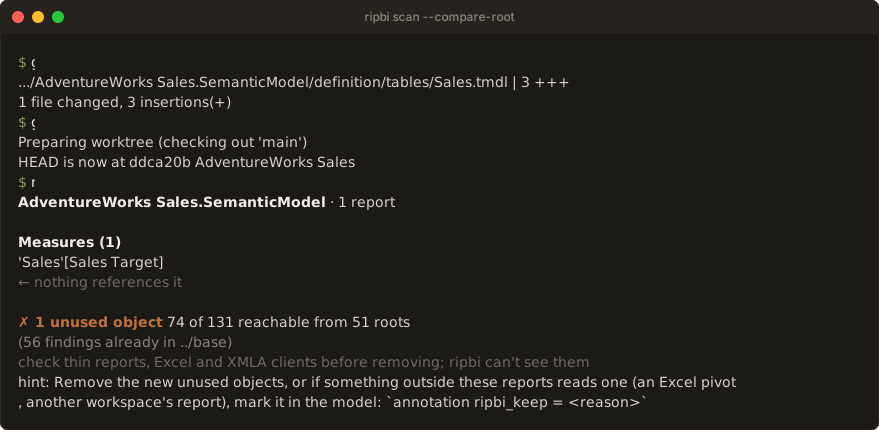
The same scan, twice. The other side gets the same PATH,
--model,--report, and flags. Relative paths are rebased ontoDIR, soripbi scan Sales.pbip --compare-root ../basecomparesSales.pbipwith../base/Sales.pbip. Absolute paths are used unchanged on both sides, for example a shared report folder outside the repository. Discovery runs inDIR, andDIR's ownripbi.tomlapplies there. Every connected report is compared on both sides, so a change that removes a report's last binding to a measure makes that measure a new finding. -
Git is not required. ripbi compares two folders. How the other checkout gets there is up to the pipeline:
git worktree, a second clone, or a previous release's.pbixstored at the same relative path. -
Matching. A finding matches by kind and display id, compared case-insensitively like the engine compares names. A broken binding also matches on its reason and binding site, a report-level broken artifact on its report item's name, and an auto date/time table on its verdict. File paths are never compared, so the two checkouts can live anywhere. A renamed object reads as one new finding plus one fixed.
-
Existing findings count every finding the other checkout's scan detected, including ones its
[scan].ignoreor--typehid. So a finding is new only when it truly did not exist there, and this checkout's own filters decide what is reported. Existing findings are left out of every output mode and the exit code, like[scan].ignoresuppressions. The human modes count them under the summary line:(412 findings already in ../base). A dead auto date/time table's own finding goes with its row.--compare-label mainmakes thatalready in main, here and in every other output that names the checkout, for a CI run that knows which branch it holds. -
Fixed findings are the other checkout's findings this scan no longer detects at all, whether reported, ignored, filtered, or suppressed. A finding hidden by
--typeis still detected, so it is not fixed. Human output lists them in aFixed since <DIR> (N)section at the end,--summarycounts them,--plainprints onefixed:<type>\t<id>record each, and--jsonlists them undercompare.fixed. Fixed findings never fail the run. When this scan's ingest recorded anunknown_objectskip notice, a finding may have vanished because its object failed to parse rather than because it was removed: the list then carries a caveat, andcompare.fixed_uncertainistrue. -
Baseline coverage. Every comparison records how far the other checkout's scan can be trusted, as
compare.baselinein--json:scanned: the scan ran there against connected reports, and every finding compares as described above.skipped: the model was there, but no report was connected to it (or onlystub-reportstubs), typically because this change connects the model's first report. Usage was never checked there, so the comparison does not read that as "zero findings". A! baseline skipped in …note on stderr says so, with or without--allow-no-reports. Objects still compare by identity:- An unused object (or a not-in-use auto date/time table) this change adds did not exist there, so it is new, reported, and gates as usual.
- An unused object that already existed there is unverified: left out
of the findings and of the exit code, and never "fixed". The human modes
count them under the summary line:
(118 unused unverified — no connected reports in main, …).--plainprints oneunverified:<type>\t<id>record each,--jsonlists them undercompare.unverified, and the Markdown summary opens with a Baseline skipped note. SARIF leaves them out ofresultsand records the gap as a run-levelinvocations[0].toolExecutionNotificationswarning. - Breakage (
broken_visual,broken_artifact) does not depend on usage and compares exactly.
unavailable: the scan could not run inDIRat all (a model this change adds, say). A! nothing to compare in …note on stderr says why, and every finding is new. SARIF records it as a run-level notification too.
Exit codes follow the reported findings only. Unverified findings never fail the run, and incomplete coverage is not a skip notice, so
--strictdoes not gate on it either. Once the change merges, the base branch has a connected report, and the next comparison isscannedagain. Until then, an object that is unused for real gets the same answer as any finding: remove it, or keep it withripbi_keep. -
A
DIRthat is not a folder is exit2. -
The keep hint. When new unused objects are reported, every mode but
--jsonends with ahint:on stderr pointing at theripbi_keepannotation, the answer for an object a consumer ripbi cannot see reads.
In CI
The ripbi GitHub Action
and the Azure Pipelines template
(templates/ripbi-scan.yml)
do all of this on pull requests: they check out the target branch beside the
repository, compare, annotate the new findings, and fail only on them. See
CI in five minutes.
By hand, the target branch needs no history, only its files:
git fetch --depth=1 origin main
git worktree add ../base FETCH_HEAD
rib scan --compare-root ../base
Accepting a finding means merging the change: once it is on the base branch, the next
pull request compares against it. An object meant to stay unused on purpose — a measure
only an Excel pivot reads — gets a ripbi_keep annotation instead; see
Keeping objects on purpose.