Human output (default)
What ripbi scan prints when no output flag is passed.
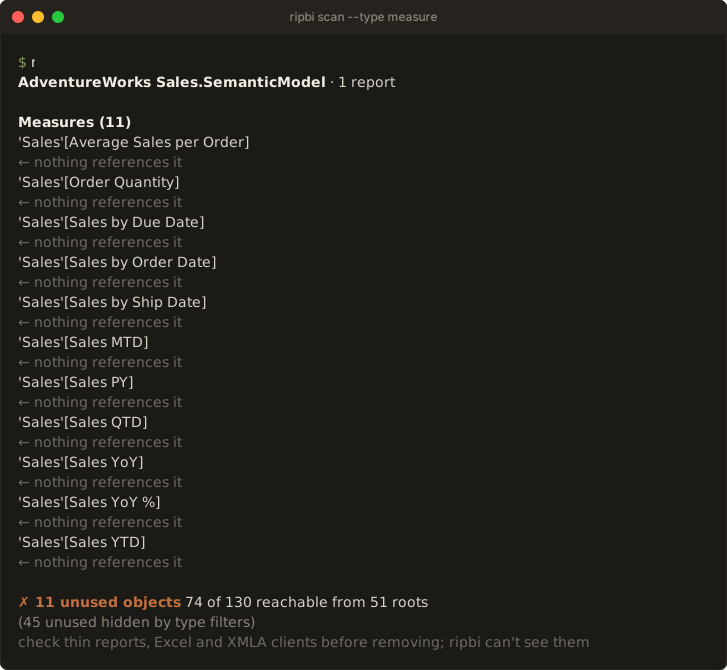
AdventureWorks Sales.SemanticModel · 1 report

Measures (11)
  'Sales'[Average Sales per Order]
    ← nothing references it
Columns (28)
  'Customer'[City]
    ← only used by hierarchy 'Customer'[Geography] — hierarchy level (also unused)
  'Customer'[Customer ID]
    ← nothing references it

✗ 56 unused objects   74 of 130 reachable from 51 roots
  check thin reports, Excel and XMLA clients before removing; ripbi can't see them
The output reads in three tiers, most important last, because the last line is the one a terminal leaves in view:
-
Header and notes (stderr). The model's name and its report count, then one indented line per note:
!for a note that changes how to read the result (stale or partial stats, a by-name pairing, a failed comparison base),·for background (a query log in use, reports bound to other models, a ripbi stub). Full paths and notes that only confirm the expected case (complete stats coverage) wait for--verbose. -
Findings and sections (stdout), described below.
-
The verdict (stdout), last:
✓ No unused objectsor✗ 56 unused objects, then how many objects reachability reached, out of the total, from how many report binding roots. Roots are report bindings — the desktop tree and the phone layout (definition.mobile/, issue #49) alike; RLS roles also seed reachability without counting here. On a terminal the scan's wall time closes the line. Indented under it: theUnused storage:total (Storage sizes); a line for objects[scan].ignoresuppressed; one for findings the type selection hid ((2 unused hidden by type filters)); and one for auto date/time machinery members covered by the section's table verdicts, soNo unused objectsfrom a filtered or machinery-heavy model never reads as a clean one by accident. -
The consumer hint (stderr), under a verdict with findings only: ripbi sees the ingested reports, not thin reports in other workspaces, Analyze in Excel, or XMLA clients, so a finding is a candidate until those are checked. With a query log it names the consumers outside the log's window instead. A clean scan has nothing to remove and prints no hint;
[scan].external_consumers = "none"inripbi.tomldrops it for a model nothing else reads. -
Findings are grouped by object type (measures, columns, hierarchies, tables, partitions, relationships, calculation items, expressions, functions, report measures, bookmarks — fixed order, empty groups omitted), sorted by object identity. The type flags restrict the groups to the selected kinds; empty groups are still never printed.
-
Chain annotations, one per referencing object:
← nothing references it— a true orphan, deletable outright;← only used by 'X' — <where> (also unused)— the sole (or all-identical case: every) consumer is itself unused, so the whole chain can go;← used by 'X' — <where>— the consumer is live but its use could not keep this object alive (a key column held only by an active relationship endpoint, or the table of an inactive relationship nothing activates).
-
The
⭘ Power Query also names it (…)annotation appears, behind--power-query, on Data columns named by M expressions. With the flag, the last finding above reads:'Customer'[Customer ID] ← nothing references it ⭘ Power Query also names it ('Customer' partition) — safe to stop loading; removing it from the script means editing those steps tooIt is supply-chain context, not a consumer: unloading the column cannot break refresh, but removing it from the Power Query script entirely means editing each named partition or expression too — cleanup-time guidance, so it is hidden by default and shown only on request. Columns without the annotation are also gone from every Power Query step — and engine-computed columns (calculated columns, auto date/time machinery) never carry it, because an M step can only name a column it produces.
--jsonalways carries the underlyingnamed_in_power_queryfield regardless of the flag. -
The Broken artifacts section follows unused findings (issue #84): one row per DAX owner with unresolved field references, whether or not a visual binds it. Indented lines list the distinct written references. Report-level measures include their report path; model objects have no report path. Several broken properties of one object still produce one row. M expressions are not checked. The section is advisory unless
--brokenis selected. -
The Broken visual bindings section follows the artifact section (issue #60): one row per report binding whose written field reference resolves to nothing in the model, or that lands on an artifact whose own DAX no longer resolves — the static form of the error state the service would render. Each row names the written reference, the reason, and the binding's site as Power BI Desktop shows it — the visual's type and literal title, the page's tab name — with the generated IDs in parentheses for finding the PBIR folder. A visual without a literal title (an auto-generated or measure-bound one) is named by its ID:
Broken visual bindings (2)
  'Sales'[Color]
    ← field not found in the model — field well 'Values' — card visual 'Colors sold' (id 'V2') on page 'Overview' (id 'P1')
  'Sales'[Broken Total]
    ← bound artifact 'Sales'[Broken Total] has unresolvable references — field well 'Values' — card visual 'V3' on page 'Overview' (id 'P1')
The section is a different verdict than reachability's — written references, not graph liveness — so it prints even on an otherwise clean
No unused objectsscan, and it is advisory: it never changes the exit code unless--brokenselects it. Under a lone--broken, the findings list is empty by construction — the flag scopes the run to breakage — so the verdict names that scope instead:✓ No broken reports or artifactswhen nothing flags,✗ 3 broken bindingswhen either breakage section has rows. Every other selection keeps the unused verdict. Hidden bindings (a type flag without--broken) and suppressed ones are accounted for in the summary's arithmetic lines:(2 broken-visual bindings hidden by type filters)and(N possible broken-visual bindings suppressed — the model ingest reported skips, listed on stderr; --strict fails on those skips). Artifact findings have corresponding hidden and suppressed counts.The precision bar is the mirror image of the unused findings': a "broken" claim is itself a breakage claim, so it fires only when nothing in the model ingest could have hidden the name the binding wrote. That is exactly the
unknown_objectskip kind — a table or column the parser skipped never became a node, so a "field not found" verdict would be a guess — and only that kind: anunknown_propertynotice means the object was parsed with its name regardless, so it does not suppress. The suppressed count rides on the summary line, and--strictsurfaces the skips behind it. Report-side skips do not suppress either way: a half-parsed report can only under-report breakage, never fabricate it. The remaining under-claiming is deliberate:- a KPI visual's synthesized variants (
… Goal,… Status,… Trend,… Value) resolve, not flag, whenever the base measure exists — the engine materializes them; - an artifact's own DAX resolving through query-time constructs never flags: a
report measure referencing a sibling report measure (the graph's ordinary
report-measure edge),
@-prefixed extension columns (ADDCOLUMNS(…, "@Krav", …)read back as[@Krav]), and the column names query time introduces in the same expression — string-literal extension names (SELECTCOLUMNS(t, "Ordning", …),GROUPBY) and the table constructor's fixedValue/Value1…Ndefaults. Verifying these needs DAX scope analysis the lexer deliberately does not do, so under-claim applies; the cost is that a typo coinciding with a string in the same measure goes unflagged; - a qualified field miss on a calculated table resolves when the partition
expression makes the name lexically visible: string literals (
DATATABLEheaders,ADDCOLUMNS/SELECTCOLUMNSnames), the constructor defaults, the columns written in the expression, and every column of the tables it references (the wrapped-table shapeFILTER/VALUESpasses through). A calculated table has no declared schema — its columns are what the expression returns — so only names visible nowhere in the expression flag; renaming a header out from under a binding still does; - field parameters resolve like any other field (#52), and auto date/time hierarchy references resolve through the variation machinery (#47); a variation-flavored hierarchy the machinery cannot resolve stays silent rather than risk calling serialization drift a breakage;
- a measure referenced through a stale or wrong table qualifier still resolves (measure names are model-global), and a same-named hierarchy or calculation item behind a stale column name resolves too;
Writtenreferences the parser could not structure (legacy layouts, unresolved query aliases) resolve as always but never flag — the written form is too loose for a breakage claim.
Bookmarks on deleted pages never reach this check: their sections are skipped as stale at ingestion. The phone layout binds identically to the desktop tree, so a broken binding there reports with
mobile layout …provenance. A binding onto a broken artifact still counts as a root (it resolves — that is what it does), so the artifact itself is not reported unused by it; its own broken-artifact finding appears independently, whether or not a visual binds it. - a KPI visual's synthesized variants (
-
The Auto date/time section follows the findings: one verdict per
LocalDateTable_*/DateTableTemplate_*table, naming the user's date column the machinery serves. It is a provenance verdict, not a reachability one — the engine's own relationship keeps the machinery alive, so "alive" says nothing. The section is table-shaped: it prints (and carries its exit-code weight) only when no type selection is passed or--type tableis among it; hidden, it is absent from every output mode.in use — replace with a real date table— a report binding lands on the machinery (usually a visual's date hierarchy over the varied column). Informational; it never fails the exit code.unused by reports — disable auto date/time— nothing binds it, yet reachability keeps it alive: pure bloat the findings list cannot express, because the object is not dead.dead— nothing reaches it at all; the table's own finding (with its chain annotations) is filed here instead of the genericTablesgroup.
The section is also the only place the machinery appears (issue #47): its unused members — the GUID-named columns, hierarchies, and partitions under those tables — are never generic findings, because they are not separately actionable. Removing the table removes them, and disabling auto date/time on the named column is the fix; the summary line accounts for them (
(41 unused auto date/time members covered by their tables' verdicts)), and--jsonreports the count assummary.auto_date_time.member_findings. -
Auto date/time is a recommendation, not a law: a legacy model that keeps the feature can silence the section through the ordinary
[scan].ignoreglobs —[scan] ignore = ["LocalDateTable_*", "DateTableTemplate_*"]Suppressed tables count as handled, so they cannot fail the exit code, and a dead table's own finding — suppressed with its row — counts in
summary.ignored. The trade-off: the recipe also hides thein usetables' advice, which is the part worth reading when you plan the migration to a real date table.