Validate
Commands for checking model quality — locally, against a live model, and in CI. See Output & scripting for the CI-specific flags.
bpa — Best Practice Analyzer
bpa run evaluates the model against a rule collection and reports findings
by severity; --fix applies auto-fixes where the rule provides one
(FixExpression).
Besides property assignments (IsHidden = true) and Delete(), a fix expression can
rewrite the object's DAX:
| Fix expression | Rewrite | Used by |
|---|---|---|
QualifyColumnReferences() |
[Amount] → 'Sales'[Amount] |
DAX_COLUMNS_FULLY_QUALIFIED |
UnqualifyMeasureReferences() |
'Sales'[Total] → [Total] |
DAX_MEASURES_UNQUALIFIED |
Only the flagged references change; formatting and comments are kept. A reference the
rewrite cannot resolve for certain leaves the expression untouched and is reported under
fix errors instead. For example, a column name that exists in more than one table, a
name that also appears as a string literal (a column the expression builds with
ADDCOLUMNS), or a measure qualified with a table it does not belong to.
A property assignment takes a quoted string, a boolean, or an enum member. A quoted
string is taken literally, so a model-provided rule can assign DAX; escape an inner
quote as \":
An unquoted value with ( or [ is code the fixer cannot evaluate (for example
string.Concat(...) or Partitions[0].Name = it.Name). Findings of such a rule are not
marked fixable; --fix lists the rule once with its finding count
(unsupportedFixes in JSON) and leaves them for you to fix.
--fix without --save or --stage previews every pending fix and changes nothing.
Fixes are grouped by rule. A property fix shows its change once over every object
that gets it; text values are quoted, booleans and enum values are not. A fix that
changes an expression shows its full before and after text per object,
DAX syntax-highlighted in a terminal and plain when piped, capped at 12 lines each:
Pending fixes:
  HIDE_FOREIGN_KEYS  2 columns
    IsHidden: false → true
      Product/Category
      Category/Category
  DAX_COLUMNS_FULLY_QUALIFIED  1 measure
    Sales/Margin %
      Expression:
        Before:
          DIVIDE([Margin], SUM([Amount]))
        After:
          DIVIDE([Margin], SUM('Sales'[Amount]))
A batch lists up to 10 objects; add --full to list them all.
When fixes or rule-ignore changes are saved, the shared validation gate blocks
new model errors before writing. Use --force to save and report them anyway,
or tx config set validateOnSave false to disable the gate (default: on).
The default standard ruleset is a curated high-signal subset of the bundled
catalog — rules that catch broken models, expensive-at-scale patterns, and a
small core of consumer-experience checks. Use --ruleset full for the entire
bundled catalog (including style, advisory, and heuristic rules that fire on
most models).
The catalog grows through presets rather than through the default set: a
category whose rules would bury real findings on most models ships
default-off. Neither standard nor full includes a default-off category; its
own --ruleset preset (the category name in kebab case) opts in, and presets
combine with commas — for example --ruleset standard,vertipaq. The
vertipaq preset holds the rules that need VertiPaq statistics (see below).
Localization is also default-off once its rules ship: on a single-culture
model, translation rules would report every visible object.
standard also drives the deploy BPA gate, which blocks on
error-severity findings by default. Error severity is therefore reserved for
findings that mean the model is broken: a data column with no source column,
an expression-reliant object with no expression, invalid characters in a name
or description, USERELATIONSHIP against a table with row-level security, and
sort-by or hierarchy columns hidden from MDX (see
IsAvailableInMdx). Everything else in standard is
a warning or info that bpa run reports without blocking a deploy
(deploy --bpa-fail-on warning blocks on warnings too).
Rules that read VertiPaq statistics are in the default-off vertipaq preset, so
neither standard nor full includes them. A run without --ruleset loads vertipaq
alongside standard when the model has statistics (Vertipaq_* annotations, or
--vpax); the "Rules loaded" line then lists the vertipaq ruleset. A ruleset you name
is used as given, so --ruleset standard skips them and --ruleset 'standard,vertipaq'
asks for them on any model. On a model without statistics, these rules are not run: bpa run
lists them under "Not checked" and doesn't count them as passed. In JSON they
appear in missingVertipaqStatsRules and as MissingVertipaqStats diagnostics.
They don't fail the run. Statistics only exist on a deployed model, so there are two
ways to provide them:
- Write them into the model with
tx vertipaq --annotate --save. This works on a connected model, or on a local model connected in workspace mode (the statistics are read from its deployed mirror). - Export them once from the deployed model and pass the file with
--vpax. The statistics are applied in memory for the run only; the model is not changed. Use this for a model file, a read-only connection, or CI:
--vpax matches tables, columns, and relationships by name, so export without
--obfuscate. Its statistics take precedence over Vertipaq_* annotations the model
already has. If none of the file's tables are in the model, the run fails
(TOMIX_BPA_VPAX_MISMATCH). If only some are missing, it warns and checks the rest
(TOMIX_BPA_VPAX_PARTIAL). Re-export after changing the model so the statistics
stay current.
The vertipaq preset holds every bundled rule that reads statistics:
| Rule | Flags |
|---|---|
FIX_REFERENTIAL_INTEGRITY_VIOLATIONS |
Warning. A relationship whose "from" side has values the "to" side lacks, which shows as a blank member in slicers. |
AVOID_BI-DIRECTIONAL_RELATIONSHIPS_AGAINST_HIGH-CARDINALITY_COLUMNS |
Warning. A column with more than 100,000 distinct values in a bi-directional relationship. |
LARGE_TABLES_SHOULD_BE_PARTITIONED |
Warning. A table of more than 25 million rows with a single partition. |
LARGE_SHARE_OF_MODEL_SIZE |
Info. A table that takes more than half of a model of at least 100 MB, so you know where size savings are. |
UNUSED_HIDDEN_HIGH_CARDINALITY_COLUMNS |
Warning. A hidden column with more than a million distinct values that no relationship, sort-by, hierarchy, or DAX expression uses. Reports and external tools are not visible to the check, so confirm before removing it. |
The bundled catalog is embedded in the application and cannot be overridden by
placing a file beside the executable. Use --rules, bpa.rules, model rule
annotations, or the bpa rules commands for explicit customization.
Models can carry their own rules: the BestPracticeAnalyzer annotation embeds
rule definitions directly, and the BestPracticeAnalyzer_ExternalRuleFiles
annotation lists rule files to load. Relative external-file paths resolve
against the model's folder (not the current directory), and Windows-style
separators (..\.devops\bpa-rules.json) work on every platform. When the same
rule ID appears in more than one source, the higher-precedence source wins:
ruleset < user rules (the rule-source chain) < external files
< model-embedded — so a model's own rules always override the ruleset copy.
Among multiple external files, earlier entries in the annotation win. To detach
a model from an external rule file, remove the annotation:
| Option | Description |
|---|---|
-r, --rules <file> |
BPA rule files or URLs, as JSON. |
--ruleset <name> |
Standard ruleset: standard (curated default), full, microsoft, microsoft-it, microsoft-ja, microsoft-es, or a default-off category preset. Combine presets by repeating the option (--ruleset standard --ruleset full) or with commas; in PowerShell, quote a comma list ('standard,full'). |
--rule <id> |
Run only specific rule(s) by ID. |
--vpax <file.vpax> |
Read VertiPaq statistics from a file exported with tx vertipaq --export, for the rules that need them. Applied in memory only. |
--path <path> |
Limit analysis to matched objects (literal names, wildcards, or paths). |
--errors / --warnings / --info |
Show only rules of that severity (combinable). |
--fail-on <threshold> |
Failure threshold: error (default) or warning. Rules that cannot be evaluated count as error-severity findings and block under either threshold. |
--fix |
Fix violations whose rules provide a fix expression. Destructive Delete() fixes are skipped unless --allow-delete is set. |
--allow-delete |
With --fix: also apply destructive Delete() fixes that remove model objects. Reference tracking cannot see report visuals or external consumers, so review staged changes before deploying. |
--save / --save-to <path> |
Persist the model after applying fixes. Without these (or --stage), --fix only previews. |
--stage / --revert |
Stage the fixes instead of saving them (commit with tx stage commit), or discard this model's staged changes. |
--serialization <tmdl\|bim> |
On-disk format when saving (defaults to the loaded model's). |
--no-sync |
Skip the workspace mirror when workspace mode is active. |
--details / --full |
Show full guidance per rule / list every affected object. |
--no-multiline |
Show each rule's guidance on one line. Text output only. |
--no-model-rules / --no-defaults |
Skip rules embedded in the model / leave the selected standard ruleset out. |
--allow-external-rules |
Also load remote (URL) rule files referenced by the model's rule annotations. Skipped by default so a model file cannot make tx fetch arbitrary URLs. |
--ci <github\|vsts> |
Print CI log-group commands to stderr. |
--trx <path> |
Write results to a .trx test-run file. |
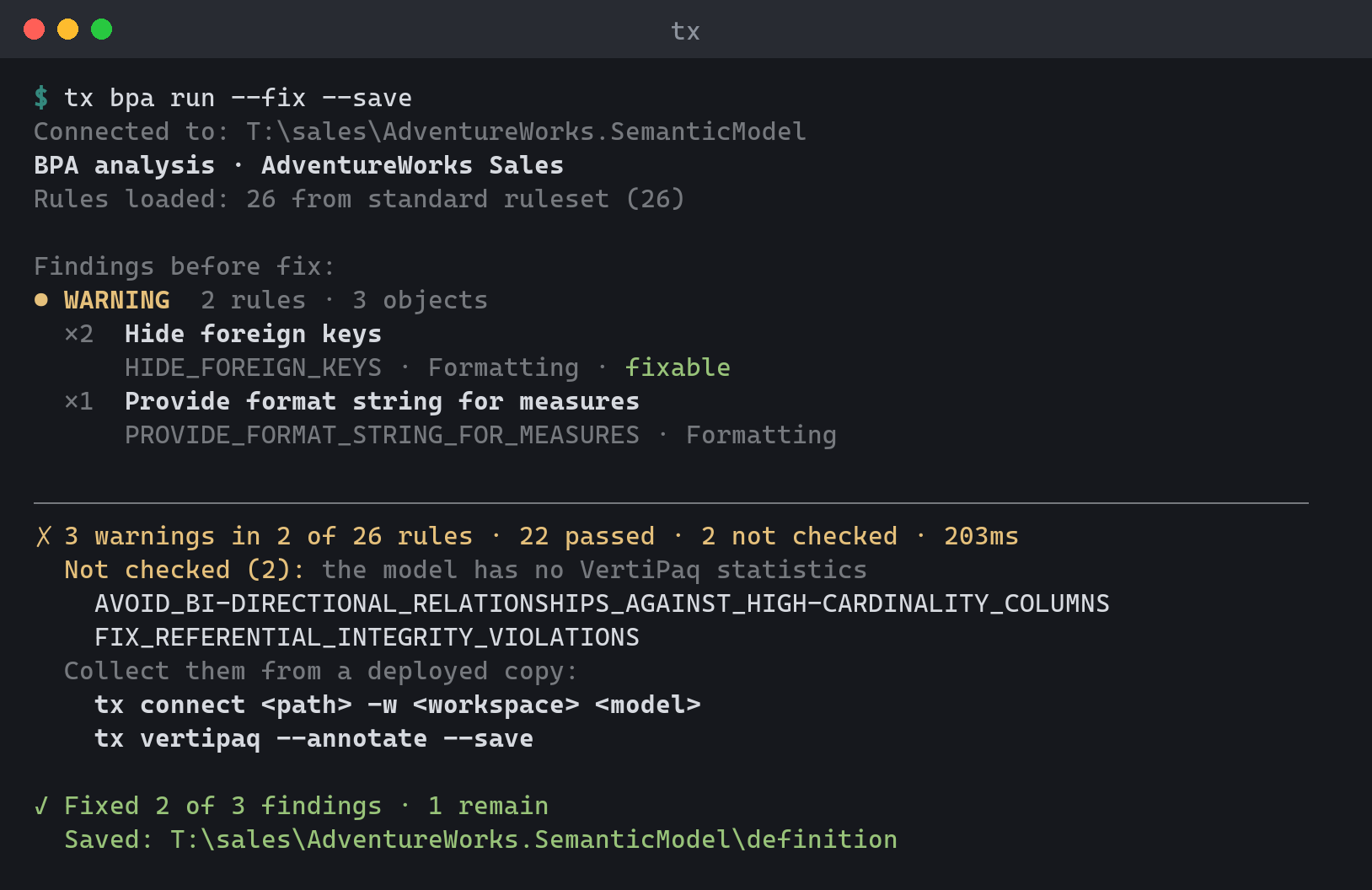
Text output groups findings by severity. Each rule shows its object count, its name,
and a line with its ID, its category and whether it is fixable. --details adds the
guidance and lists the affected objects one per line. The summary line counts the
findings and shows how many of the evaluated rules passed; rules that were not
checked for lack of VertiPaq statistics are counted separately. Next-step commands are
printed ready to copy on stderr, reusing your model path and rule options. After
--fix --save (or --stage), the output shows how many findings were fixed and remain,
and whether the result was saved or staged. The rules are evaluated again after
fixing, and the exit code and --fail-on apply to the findings that remain, so a run
that fixes every blocking finding exits 0. JSON reports this as remaining.
--fix without --save, --save-to, or --stage previews the fixes without changing the model. Each pending fix is
listed with its rule and, for a property fix, the value before and after
(IsHidden: "false" → "true"); the summary says how many findings the fixes would
leave. Because nothing changed, the exit code and --fail-on apply to the model as it
is. JSON sets preview and status: "preview", keeps fixesApplied at 0, and adds
fixesPending, wouldRemain, and a fixes array (ruleId, objectType,
objectPath, action of set or delete, property, before, after), so CI can
diff a preview. With --save or --stage, fixes lists the fixes that were applied.
bpa run --fix --allow-delete --save (or --save-to, --stage) deletes model objects,
so it asks for confirmation; --revert (drops staged work) asks too. A preview never asks. Pass --yes to skip
the prompt in scripts.
bpa rules manages rule collections:
| Subcommand | Description |
|---|---|
bpa rules list |
List the rules in effect, once per rule ID, grouped by category, with each rule's severity, scope, status, and whether it is fixable. Includes the rules in your config-dir bpa-rules.json (source user). With a model (or, when none is named, a local active connection), also lists the model's embedded and external-file rules (remote URLs are reported, not fetched) and any rule-load diagnostics. A rule the model ignores shows as ignored (model), one you ignore with --user as ignored (you), and one ignored both ways as ignored (you, model). |
bpa rules show <rule-id> [model] |
Show one rule in full: description, reference link, source, scope, expression, and fix expression. Accepts --ruleset and --no-defaults like list, and like list uses a local active connection when no model is named. An unknown ID fails with TOMIX_BPA_RULE_NOT_FOUND and suggests IDs that contain what you typed. |
bpa rules ignore <rule-id> [model] / bpa rules unignore <rule-id> [model] |
Add or remove a rule on the model's ignore list. With --user, ignore it (or stop) just for you, on this machine, for every model. See Ignoring rules. |
bpa rules add [model] --id <id> ... |
Add a custom rule to your rules file, or to the model's rules with a model. Needs --name, --scope, and --expression; see Authoring rules. |
bpa rules set <rule-id> [model] ... |
Change fields of a rule in your rules file or the model's rules. |
bpa rules remove <rule-id> [model] |
Delete a rule from your rules file or the model's rules. |
bpa rules init |
Create an empty rules file. |
ignore checks the rule ID first, so a typo can't silently turn off
nothing. The ID must belong to the bundled catalog (every ruleset), your config-dir
bpa-rules.json, the selected --rules-file, or, for ignore, the model's embedded
or local external rules. An unknown ID fails with TOMIX_BPA_RULE_NOT_FOUND and suggests
close matches. If a rule source can't be read (for example, a remote rule file,
which is never fetched here), the check is skipped. Pass --allow-unknown to use an
ID anyway. unignore accepts any ID, so you can always clean up an entry
for a rule that no longer exists.
bpa rules --rules-file <file> points the subcommands at a BPA rules JSON
file. bpa rules list narrows what is listed:
| Option | Description |
|---|---|
--ruleset <name> |
Standard BPA ruleset to list: standard, full, microsoft, microsoft-it, microsoft-ja, microsoft-es. Repeat it to combine presets. |
--no-defaults |
Leave the built-in ruleset out of the listing. |
--ignored |
List only ignored rules, whether you or the model ignores them. |
--all |
Include ignored rules in the listing. |
IsAvailableInMdx
The catalog has two rules about a column's IsAvailableInMdx property, and
they point the same way:
- Set IsAvailableInMdx to true on necessary columns
(
SET_ISAVAILABLEINMDX_TO_TRUE_ON_NECESSARY_COLUMNS, error, instandard). A column that sorts another column, is sorted by one, is a hierarchy level, or is used in a variation needs its attribute hierarchy. Without it, queries fail, so the deploy gate blocks on it. - Set IsAvailableInMdx to false on non-attribute columns
(
ISAVAILABLEINMDX_FALSE_NONATTRIBUTE_COLUMNS, warning,--ruleset fullonly). A hidden column that is none of those things doesn't need an attribute hierarchy, and turning it off saves processing time and memory. It is an optimization, so it never blocks a deploy.
The second rule skips every column the first rule protects, so no column is flagged by both, and applying its fix never trips the first rule. A tested guarantee keeps it that way. Some community rule sets have a simpler variant, "false on every hidden column", with no exceptions. Don't combine that variant with these rules: it turns off hierarchies that sort-by columns and hierarchy levels need, so the two rules contradict each other on those columns.
Rule sources
bpa run loads rules from a chain of sources. Each source is optional:
- The
--rulesetpresets (standardunless you choose another). - Your config-dir
bpa-rules.json, whichbpa rules addwrites. - The
bpa.rulesconfig key: files or URLs separated by;. Relative paths resolve against the config directory (~/.tomix, or$TOMIX_CONFIG_DIR). - The
TOMIX_BPA_RULESenvironment variable, in the same format. Use it in CI pipelines. Relative paths resolve against the working directory. --ruleson the command line.- The model's own rule annotations (see below).
tx config set bpa.rules "team/bpa-rules.json;https://example.com/org-rules.json"
TOMIX_BPA_RULES=.devops/bpa-rules.json tx bpa run .
When two sources define the same rule ID, the later source wins, so the
command line overrides the pipeline, and the pipeline overrides your config.
A missing file or failed download stops the run with
TOMIX_BPA_RULES_LOAD_FAILED and names the setting that pointed at it.
The other commands read the same settings:
bpa rules listandshowlist the rules frombpa.rulesandTOMIX_BPA_RULESwith sourcebpa.rulesorTOMIX_BPA_RULES. A source that can't be loaded is reported as a diagnostic, and the listing still shows every other source.bpa rules listshows each rule ID once, from the source that wins by the same order asbpa run. A team or model rule that replaces another source's copy says so (overrides standard; JSONoverrides).bpa rules showstill prints every source's copy, so you can compare an override with the original.bpa rules ignoreaccepts IDs from their local files.- The
deployBPA gate checks thestandardruleset, thenbpa.rules,TOMIX_BPA_RULES, and--bpa-rules, with the same override order. It doesn't load your personal config-dirbpa-rules.jsonor the model's rule annotations.
Every run says where its rules came from, so a pipeline log shows what was checked:
Rules loaded: 29 from standard ruleset (26) + .devops/bpa-rules.json via TOMIX_BPA_RULES (2) + model annotations (1)
Each count is the number of rules that source contributed after overrides.
When a higher-precedence source replaced some of them, the count says so: with
--ruleset standard,full, the line reads standard ruleset (0; all 26
overridden) + full ruleset (70). In JSON, the same information is in
ruleSources: one entry per source with name, kind (machine, user,
external, or modelEmbedded), origin (ruleset, userFile, config,
environment, option, or model), rules, and overridden.
Ignoring rules
bpa rules ignore switches a whole rule off at one of two levels:
ignore / unignore |
ignore --user / unignore --user |
|
|---|---|---|
| Applies to | One model, for everyone who uses it | You, on this machine, for every model |
| Stored in | The model's BestPracticeAnalyzer_IgnoreRules annotation (shared with Tabular Editor); needs --save like any model change |
bpa-disabled.json in the config directory; takes effect at once |
--user can't be combined with a model or with --save, --stage, and the
other save options; that fails with TOMIX_OPTION_CONFLICT. bpa rules disable
and enable, the earlier spellings of ignore --user and unignore --user, still
work but are no longer listed in help.
A rule runs only when neither level ignores it. Unignoring at one level leaves
the other in force, so unignore checks the other level and warns:
unignore --userwarns withTOMIX_BPA_RULE_STILL_IGNORED_BY_MODELwhen your active local model still ignores the rule, and shows theunignorecommand to run.unignorewarns withTOMIX_BPA_RULE_STILL_IGNORED_BY_USERwhen you still ignore the rule, and shows theunignore --usercommand to run.
unignore --user doesn't add a rule to the ruleset. For a rule that's only in
--ruleset full (or in a default-off category), it warns with
TOMIX_BPA_RULE_NOT_IN_RULESET and names the --ruleset value that runs it.
bpa rules list shows both levels, and --ignored lists rules ignored at
either one. In JSON, each rule has ignoredByUser and ignoredByModel
booleans next to status, which keeps its earlier single value (disabled for
a rule you ignore, which wins over ignored). The summary counts a rule
ignored both ways in both disabled and ignored.
bpa run counts skipped rules in disabledRules. The JSON also lists them by
level in userIgnoredRules and modelIgnoredRules; a rule ignored both ways
is in both lists. ignoredRules counts findings on individual objects that an
object-level ignore annotation suppresses, not whole rules.
Authoring rules
bpa rules add, set, remove, and init edit a rules JSON file: your config-dir
bpa-rules.json (~/.tomix, or $TOMIX_CONFIG_DIR), which bpa run loads on every
run, or the file named by bpa rules --rules-file <file>. Remote rule files can't be
edited (TOMIX_BPA_RULES_FILE_REMOTE). Fields tx does not know about are kept as they are.
| Option | Description |
|---|---|
--id <id> |
Rule ID (add only; set and remove take it as an argument). An ID the file already has fails with TOMIX_BPA_RULE_EXISTS. |
--name <text> |
Rule name shown in results. Required for add. |
--scope <types> |
Object types the rule checks, comma-separated, for example "Measure, CalculatedColumn". Required for add. Unknown types fail with TOMIX_BPA_RULE_INVALID_SCOPE, which lists the valid ones. |
--expression <expr> |
Rule expression; an object that matches it is a violation. Required for add. |
--severity <level> |
error, warning, or info (or 3, 2, 1). Defaults to warning. |
--category <name> |
Category the rule is grouped under. Defaults to Custom. |
--description <text> |
Guidance shown with violations. |
--fix-expression <expr> |
Fix that bpa run --fix applies. |
With set, pass only the fields to change; an empty value (--description "")
removes an optional field. add creates the file when it doesn't exist; set and
remove fail with TOMIX_BPA_RULES_FILE_NOT_FOUND. init won't replace an
existing file unless you pass --overwrite. Built-in rules can't be edited or removed.
Turn one off with bpa rules ignore, or override it by adding a rule with the same ID.
tx bpa rules add --id MEASURE_DESCRIPTIONS --name "Measures need a description" --scope Measure --expression "string.IsNullOrWhitespace(Description)"
tx bpa rules set MEASURE_DESCRIPTIONS --severity error
tx bpa rules remove MEASURE_DESCRIPTIONS
tx bpa rules --rules-file team-rules.json init
Rules that ship with the model
Give add, set, or remove a model (as the argument, or with --model, --recent,
or --server) and they edit the model's BestPracticeAnalyzer annotation instead of a
file. Those rules travel with the model, and bpa run and bpa rules list pick them up
as source model-embedded. The same field checks apply, and fields tx does not know
about are kept. A model and --rules-file together fail with
TOMIX_BPA_RULES_TARGET_CONFLICT.
The edit is a model mutation, like bpa rules ignore: nothing is written until you pass
--save (or --stage), and --save-to, --serialization, --revert, --no-sync, and
--force work as they do for set. Removing the last rule removes the annotation.
Rules found only under the old misspelled BestPractizeAnalyzer key are moved to the
correct key on the first edit. init only creates files.
tx bpa rules add . --id MEASURE_DESCRIPTIONS --name "Measures need a description" --scope Measure --expression "string.IsNullOrWhitespace(Description)" --save
tx bpa rules set MEASURE_DESCRIPTIONS . --severity error --save
tx bpa rules remove MEASURE_DESCRIPTIONS . --save
The BPA gate also runs automatically on deploy (--skip-bpa to bypass,
--fix-bpa to auto-fix first, --bpa-rules to point at specific rule files,
--bpa-fail-on to lower the blocking threshold to warnings — errors block by default).
The deploy gate loads bpa.rules and TOMIX_BPA_RULES (see Rule sources)
and honors bpa rules ignore --user for the rules it loads. bpa run also loads your
config-dir bpa-rules.json and the model's rules, so the commands may report different findings.
A rule that cannot be compiled or evaluated is itself an error-severity finding
("rule could not be evaluated: \<reason>"), so a typo in a rule expression fails
bpa run and the gates instead of silently skipping the rule.
On save, BPA runs only when --fix-bpa is passed; rules that cannot be
evaluated block the save even when other fixes were applied.
The gate never applies
destructive Delete() fixes — those are only available via
bpa run --fix --allow-delete.
validate — DAX, Power Query and model integrity
Offline analysis runs on every DAX-bearing expression (measures, calculated
columns/items/tables, row-level security filters (each reported on its table
permission, Roles/<role>/<table>), secondary measure expressions, calculation
group selection expressions, and calculation item format strings). Syntax is
checked first: illegal characters, unterminated string/table/bracket literals
and block comments, and unbalanced parentheses or braces are reported as
DAX0004/DAX0005 errors. When those pass, the DAX parser reports its first
grammar error: a missing comma or leftover text (DAX0007), a missing operand
(DAX0008), or a VAR without = or RETURN (DAX0009). When an expression's syntax is broken, its
reference checks are skipped, since a never-closed bracket makes everything
after it read wrong. Syntactically valid expressions then get the offline
reference checks (DAX0001–DAX0003 and DAX0010, see error codes).
Power Query (M) partition sources and shared expressions, including M
parameters, are lexed and parsed by the same offline engine tx format uses
for M. Each one that does not parse is reported as an M0001 error with
its line and column. The check needs no network and no Power BI Desktop; the
engine starts only when the model has M, and adds roughly 20–100 ms per
expression. --no-m skips it.
In text output each finding shows the offending expression line under its
message, syntax-highlighted when it came from DAX; --no-multiline collapses
the cell back to one line. Every issue carries a severity: --output-format
json includes it as a string ("severity": "Error" / "Warning") on each
issue, CI annotations emit errors as errors and warnings as warnings (the run
still exits 1 only for errors), and the TRX projection maps each issue's
severity to its test outcome.
| Option | Description |
|---|---|
--ci <github\|vsts> |
Print CI log-group commands to stderr so findings annotate the PR. The text table is then printed without wrapping (also under Azure Pipelines without --ci). |
--trx <path> |
Write results to a .trx test-run file. |
--errors-only |
Only show errors. |
--no-warnings |
Leave out analyzer warnings. |
--server-only |
Only show errors reported by the connected server. |
--no-m |
Skip the Power Query (M) syntax check (M0001). |
--no-multiline |
Show multi-line cell content on one line. Text output only. |
The banner names the model being validated: the TOM database name, falling
back to the Fabric .platform displayName, then to the file/folder name —
so a nameless TMDL folder still shows its own name instead of (unnamed).
test — DAX regression tests
Runs DAX regression tests against a live model and exits 1 on any mismatch,
so a pipeline can block a merge when a query result drifts. Each test is a
.dax file paired with a sibling <name>.expected.json snapshot; path is a
single test file or a directory searched recursively for .dax files
(default: the current directory). Test names are the file paths relative to
path, without the extension (totals/sales-by-region).
| Option | Description |
|---|---|
--update |
Record mode: run each query and (re)write its .expected.json from the actual result, listing what each rewrite changed. Byte-identical snapshots are left untouched. |
--update-missing |
Record snapshots only for tests that have none yet, and compare every other test as usual. Cannot be combined with --update. |
--filter <pattern> |
Run only tests whose name matches a * wildcard pattern (case-insensitive). |
--param <name=value> |
Query parameter applied to every test, referenced as @name in DAX. Repeatable. |
--max-rows <n> |
Per-query row cap; a query exceeding it fails as an error (default: 10000). |
--tolerance <value> |
Accept numeric cells within this difference: absolute (0.01) or relative to the larger value (0.1%). Applies to every test unless it sets its own. |
--ignore-row-order |
Sort rows by their values before comparing, so queries need no ORDER BY. |
--ci <github\|vsts> |
Print CI log-group commands to stderr so failures annotate the PR. |
--trx <path> |
Write results to a .trx test-run file. |
Like query, tests execute on a deployed model (XMLA) or a local
instance — never on TMDL/BIM files. Target the model with -s <workspace>
-d <model> or the active session. Read access is enough: the Viewer role
with Build permission on the model.
Workflow. Add a test by writing a .dax file (any EVALUATE query),
then record its snapshot:
tx test ./tests --update-missing -s MyWorkspace -d MyModel   # record new snapshots
tx test ./tests -s MyWorkspace -d MyModel                    # verify: all PASS, exit 0
A test without a snapshot fails the run as MISS (a new test must not
silently pass); a result that drifts from its snapshot fails as FAIL with a
difference table. --update-missing records only the MISS tests and still
compares the rest, so it never accepts a failing test and its exit code still
reports regressions.
Accept an intentional change by re-running with --update and committing the
snapshot diff — the git diff is the review artifact. --update rewrites
every snapshot, failing ones included, so it lists what it accepted: each
rewritten snapshot shows as UPDATED with a Before/After table of the cells
that changed (in JSON, the same differences and totalDifferences fields as
a failed test).
A snapshot whose .dax file was deleted or renamed is reported after the
summary as an orphan (in JSON, an orphans array of name and file). An
orphan never fails the run; delete it, or rename it to match its test.
The snapshot stores column names/types and all cell values as canonical
invariant strings (null = DAX BLANK()), plus a hash of the query text
used to hint when a failing test's query changed since recording:
{
  "version": 1,
  "querySha256": "9f2c…",
  "columns": [
    { "name": "Sales[Region]", "type": "string" },
    { "name": "[Total Sales]", "type": "decimal" }
  ],
  "rows": [
    ["East", "1234.50"],
    ["West", null]
  ]
}
Each column and each row is written on one line, so a changed value shows in
the git diff as its whole row. Snapshots recorded by earlier versions, with
one cell per line, still load; the next --update rewrites them in this
layout (UPDATED, "Same results; rewrote the snapshot file's formatting.").
Rows compare in order — end test queries with ORDER BY so results are
deterministic, or pass --ignore-row-order. Keep rowsets small and stable
(aggregates, TOPN over ordered sets); one EVALUATE rowset per file.
Comparison. Cells compare exactly by default. Averages, ratios and other
floating-point measures can differ in their last digits between engine
versions or refreshes; --tolerance accepts a numeric cell (int64,
double, decimal columns) when it is within an absolute difference
(--tolerance 0.001) or a percentage of the larger value
(--tolerance 0.1%). A measure whose data type is Variant returns an
object column; its cells get the tolerance whenever both sides are numbers.
BLANK() never matches a number, and text, date and boolean cells always
compare exactly. With --ignore-row-order, both sides are sorted before
comparing — text and date columns first, then numeric and object columns
by value — and difference row numbers refer to that sorted order.
Per-test settings. A test sets its own comparison in tx: comment lines
before the query; these override the command-line options for that test:
// Average order value by region
// tx: tolerance=0.01% ignore-row-order
EVALUATE
SUMMARIZECOLUMNS ( Sales[Region], "Avg", [Avg Order Value] )
Directives are tolerance=<value> (tolerance=0 compares exactly) and
ignore-row-order (ignore-row-order=false turns a command-line
--ignore-row-order off). Only // or -- lines before the first
statement are read. An unknown directive or a bad value fails the test as
ERR, so a typo never silently compares exactly.
tx test ./tests
tx test ./tests/totals/sales.dax --update
tx test ./tests --update-missing
tx test ./tests --filter "totals/*" --trx results.trx --ci vsts
tx test ./tests --tolerance 0.01% --ignore-row-order
vertipaq — storage statistics
VertiPaq Analyzer-style storage statistics for a live model, with .vpax
export/import for offline analysis.
| Option | Description |
|---|---|
--tables / --columns / --relationships / --partitions / --all |
Which view(s) to show (--columns is the default). |
--detail |
Extra columns: data/dictionary/hierarchy size breakdown, encoding, segments. |
--stats |
Model-level storage summary. |
--top <n> |
Limit each view to the N largest rows. |
--fields <list> |
Comma-separated fields to display (single view; text/csv only). |
--export <file.vpax> |
Export statistics to a .vpax file. |
--import <file.vpax> |
Analyze a previously exported .vpax offline (no connection needed). |
--obfuscate |
Mask names and expressions in the export; a private .dict dictionary keeps the mapping. |
--annotate |
Write statistics into the model as Vertipaq_* annotations (preview unless --save). |
--save |
With --annotate, write the annotations to the model. |
--force |
With --annotate --save, write despite newly introduced validation errors and report them. |
tx vertipaq
tx vertipaq Sales --detail
tx vertipaq --stats --all --top 10
tx vertipaq --export stats.vpax
tx vertipaq --import stats.vpax --relationships
diff — compare two models
Compares two models (TMDL folders or .bim files) and shows structural
differences. Exit codes are CI-friendly: 0 = identical, 1 = differences
found, 2 = error.
When one side is a live database, engine-computed state is ignored so that comparing source files against a processed model reports only authored changes. An inferred measure data type present on only one side, calculated-table columns present on only one side, and data type differences between calculated-table columns present on both sides are not reported. Other column property changes remain visible. Comparing two authored sources reports these differences because they may be authored changes.
In JSON output, each row of data.changes has the following fields. The
objectType and path meanings depend on the action:
| Action | objectType |
path |
oldValue / newValue |
|---|---|---|---|
added |
Object kind, for example Measure. |
Object path, for example Sales/Total Sales. |
Omitted. |
removed |
Object kind. | Object path. | Omitted. |
modified |
Object kind followed by / and the object path, for example Measure/Sales/Total Sales. |
Property name, for example Description. |
Previous and new property values; each field is omitted individually when its value is null. |
Scripts should use this current shape until a future major release introduces
objectPath and property with a deprecation window for the existing fields.
The replacement schema and release timing will be decided in that later work.
doctor — environment check
Checks whether the local tomix environment is ready. When filing a bug, attach its output.
The report is safe to share by default: your home directory is shown as ~,
and account, server, database, model, profile, and session names are replaced
by what kind of thing they are (for example directory session: Power BI /
Fabric workspace). Add --show-details to include them, for your own
troubleshooting.
doctor is strictly local and deterministic: it checks config-directory
read/write access, configuration validity, profiles, sessions (and reports
stale ones, which the next tx connect <target> removes), the current
session's connection, cached sign-in metadata (and, on Windows, that the
matching token cache file exists), and the cached update record. It never
opens the OS keystore, refreshes credentials, or contacts a model/release
service. It does not create the config directory: on a machine where tx has
not run yet, it reports that the directory will be created on first use. In an
existing config directory it writes and deletes one temporary file to test
write access. The version, how tx was installed, OS, .NET runtime, and terminal
capabilities are reported in the header in both text and JSON output. A newer
release is a WARN only when tx update can install it; a source build
(./tx) reports it as INFO.
Each check reports one status:
| Status | JSON status |
Meaning |
|---|---|---|
OK |
Pass |
Healthy. |
INFO |
Info |
A normal optional state, such as no profiles, not signed in, or no update check yet. |
WARN |
Warning |
Works, but needs attention, such as an available update or a missing token cache. |
FAIL |
Fail |
Broken; doctor exits 1. |
OK, INFO, and WARN exit 0; any failed health check exits 1.
It remains runnable when config.json is corrupt so the report can identify
the failure and direct recovery with tx config init --overwrite.