Discover
Read-only commands for exploring a model. All of them work against the
active connection or an explicit model argument,
and all print JSON with --output-format json. get is the one read command;
ls and deps are shortcuts into it. Lists, single objects, and query also
print CSV; a single object additionally emits tmdl, bim, and tmsl.
summary — what is this model
Prints where the model lives and what it contains: its source (a file path,
or the workspace endpoint and model name), the on-disk format (tmdl or
bim) for local models, the compatibility level, culture, and default
storage mode, and object counts (tables, columns, measures, relationships,
roles, partitions, calculation groups, perspectives, cultures). A good first
command on an unfamiliar model, and a quick smoke test that it opens.
AdventureWorks Sales  Model

  source              ./samples/AdventureWorks Sales.SemanticModel
  format              tmdl
  compatibilityLevel  1606
  culture             en-US
  defaultMode         Import

  Contents
    tables             10
    columns            62
    measures           20
    relationships       9
    roles               0
    partitions         10
    calculationGroups   2
    perspectives        0
    cultures            1
The labels are the JSON keys, laid out like the get
view; the next-step hint goes to stderr and is hidden by --quiet.
tx summary                           # the active connection
tx summary ./model.tmdl
tx summary --output-format json      # counts under "counts"
get — read model objects
get is the one read command. The path decides what comes back: a path that
names one object shows its properties, and a path that selects a set — a
wildcard, a container, or no path at all — lists every match. The selection
and analysis options below combine over the same path resolution, and
ls and deps are
shortcuts for get --ls and get --deps / get --unused.
| Path | Result |
|---|---|
Sales, Sales/Amount, "'Sales'[Amount]", "[Total Sales]" |
One object's properties. |
. |
The model root's properties. |
Sa*, Sales/*Amount, */Amount |
Every match, as a list. |
Tables, Measures, Sales/Measures, Sales/Partitions |
Every object in the container, as a list. |
| (omitted) | The model's tables, as a list. |
| Option | Description |
|---|---|
--query <property> |
Read just one property of one object (e.g. --query expression). |
-t, --type <type> |
Pick one object when the path matches several, or filter a list. Same vocabulary as ls --type. |
--all |
List every property of one object, including unset ones. Text output only; JSON and CSV always carry all. |
--ls |
List the objects the path selects, as a compact table. tx get Sales --ls lists Sales's children, like tx ls Sales. |
--where <prop=value> |
Keep objects whose property matches, case-insensitively. * is the only wildcard: Name=*margin* (contains), Name=margin* (starts with), Name=*margin (ends with), Name=margin (the whole value). Repeat to AND filters. The path is the scope; with no path the filter runs over the tables, so name a container (Measures) or pass --type to reach deeper. |
--deps [upstream\|downstream] |
Trace what one object uses and what uses it (default: both). |
--deep |
With --deps: walk the dependency chain recursively. |
--max-depth <n> |
With --deps --deep: how deep to walk (default: 10). |
--unused |
List measures and columns that nothing depends on, across the whole model (no path). |
--hidden |
With --unused: only unused objects that are hidden. |
--paths-only |
List one object path per line, ready for piping. |
--no-multiline |
List multi-line cell content on one line. Text output only. |
--query and --deps need a single object, so a wildcard or container path
fails with TOMIX_SINGLE_OBJECT_REQUIRED. Options that cannot apply together —
--deps with --unused, a listing option with --deps, --deep without
--deps, --hidden without --unused — fail with TOMIX_USAGE. A list
prints as text, JSON, or CSV; a single object additionally as tmdl, bim,
or tmsl; dependencies as text or JSON.
tx get                                          # the tables (same as tx ls)
tx get "Sa*"                                    # every table starting with Sa
tx get Sales/Measures                           # a container: Sales's measures
tx get Measures --where "Name=*margin*"         # measures whose name contains margin
tx get --type measure --where "Name=margin*"    # select a kind instead of a path
tx get Columns --where DataType=String --where IsHidden=true
tx get Sales --ls                               # Sales's children, as tx ls Sales
tx get "Sales/Total Sales" --deps               # what it uses and what uses it
tx get "Sales/Amount" --deps downstream --deep  # everything that depends on it
tx get --unused --hidden                        # prune candidates
get returns objects; to search property text and get the match sites back,
use find. Name filtering deliberately
overlaps between the two.
One object
The text view shows what was authored. Properties still at their default are
left out, so a column reads as its data type, source, and the few settings
someone changed instead of 25 lines of False and blanks. Unset properties you
can change with tx set are listed on one Not set: line, and read-only
defaults are dropped. Multi-line DAX and M print as an indented block under
their key, and annotations and translations get their own sections:
Sales/Profit  Measure

  description    Sales minus Cost.
  expression     [Sales] - [Cost]
  formatString   "$"#,0;("$"#,0);"$"#,0
  displayFolder  Core
  lineageTag     c892c8ee-eab9-4d1b-b4e8-80e9a996ea2e

  Not set: isHidden, dataCategory, isSimpleMeasure, sourceLineageTag
Pass --all to list every property: the header counts how many are set, defaults are dimmed (— for empty), and properties tx set cannot change are tagged read-only. --output-format json
and csv are unchanged by this: they always carry the full per-kind property set.
Each object kind has its own property set: measures include expression,
formatString, detailRowsExpression, and the KPI expressions; relationships
include their endpoint columns, cardinality, crossFilteringBehavior, and
isActive; roles include modelPermission and rlsExpression; shared
expressions include expression, kind, and remoteParameterName; DAX
functions include expression and isHidden. The model root has its own
path — tx get . reports the compatibility level, culture,
defaultMode, and the other model-level scalars (for object counts, see
summary). Object
annotations are appended as annotation:<name> entries in text and JSON
output, followed by translations as translation:<culture>/<property>
(the same token tx set takes). CSV keeps the fixed per-kind columns.
tx get "Sales/Total Sales"
tx get "Sales/Total Sales" --all
tx get "Sales/Total Sales" --query expression
tx get "Sales/Total Sales" --query annotation:PBI_FormatHint
tx get "Sales/Total Sales" --query translation:da-DK/caption
tx get "Relationships/rel-customers"
tx get "Expressions/Environment" --query expression   # a shared M parameter's value
tx get . --query culture                         # a model-level scalar
tx get Sales --output-format tmdl    # the object as TMDL
-q is the global --quiet flag, not a property shortcut — always pass the
property through --query. A --query that names no property of the object
fails with TOMIX_PROPERTY_NOT_FOUND and suggests the closest one; an unset
annotation: or translation: token reads back empty.
ls — list model objects
Alias: list. A shortcut for get --ls: both run
the same read pipeline and print identical output.
| Option | Description |
|---|---|
-t, --type <type> |
Filter by type: table, measure, column, calculatedcolumn, hierarchy, level, partition, calculationitem, member, relationship, role, perspective, culture, datasource, kpi, tablepermission, calendar, expression, function. column matches data and calculated columns; calculatedcolumn narrows to calculated ones. |
--paths-only |
One object path per line, ready for piping. |
--no-multiline |
Show multi-line cell content (e.g. measure expressions) on one line. Text output only. |
tx ls                                # the tables
tx list --type table --paths-only    # 'list' is an alias of 'ls'
tx ls Sales                          # a table's children (get Sales reads the table itself)
tx ls Sales/Measures                 # children of a container
tx ls Expressions                    # shared M expressions (parameters)
tx ls Functions                      # DAX user-defined functions
tx ls "Sa*"                          # wildcard filter
tx ls --type calculatedcolumn        # only calculated columns
find — search across the model
| Option | Description |
|---|---|
--in <scope> |
Where to look: names, expressions, descriptions, displayFolders, formatStrings, annotations, all (default; annotations only when requested explicitly). |
-t, --type <type> |
Only search objects of this kind (same vocabulary as ls --type). |
--regex |
Interpret the pattern as a regular expression. |
--case-sensitive |
Match text exactly, including letter case. |
--paths-only |
One matching object path per line, ready for piping. |
--no-multiline |
Show multi-line match context on one line. Text output only. |
Searches every scope site tx replace can rewrite — including partition
expressions, KPI expressions, detail-rows and format-string definitions,
refresh-policy M, calculation-group selection expressions, RLS filter
expressions, shared M expressions, and DAX user-defined functions — so a
find preview is also a replace preview. Relationship
names are skipped (synthesized from endpoints, not authored text), but
relationship annotations are searched under --in annotations.
tx find "SUM" --in expressions
tx find "TODO|FIXME" --regex --in descriptions
tx find "Qty" -t measure --paths-only
deps — dependency analysis
A shortcut for get --deps / get --unused: both
run the same read pipeline and print identical output.
| Option | Description |
|---|---|
--upstream |
Trace only what this object uses (get --deps upstream). |
--downstream |
Trace only what uses this object (get --deps downstream). |
--deep |
Walk the dependency chain recursively. |
--max-depth <n> |
How deep --deep walks (default: 10). |
--unused |
List measures and columns that nothing depends on. |
--hidden |
With --unused: restrict the list to unused objects that are hidden. |
-t, --type <type> |
Type to pick when the path matches several objects under a table. |
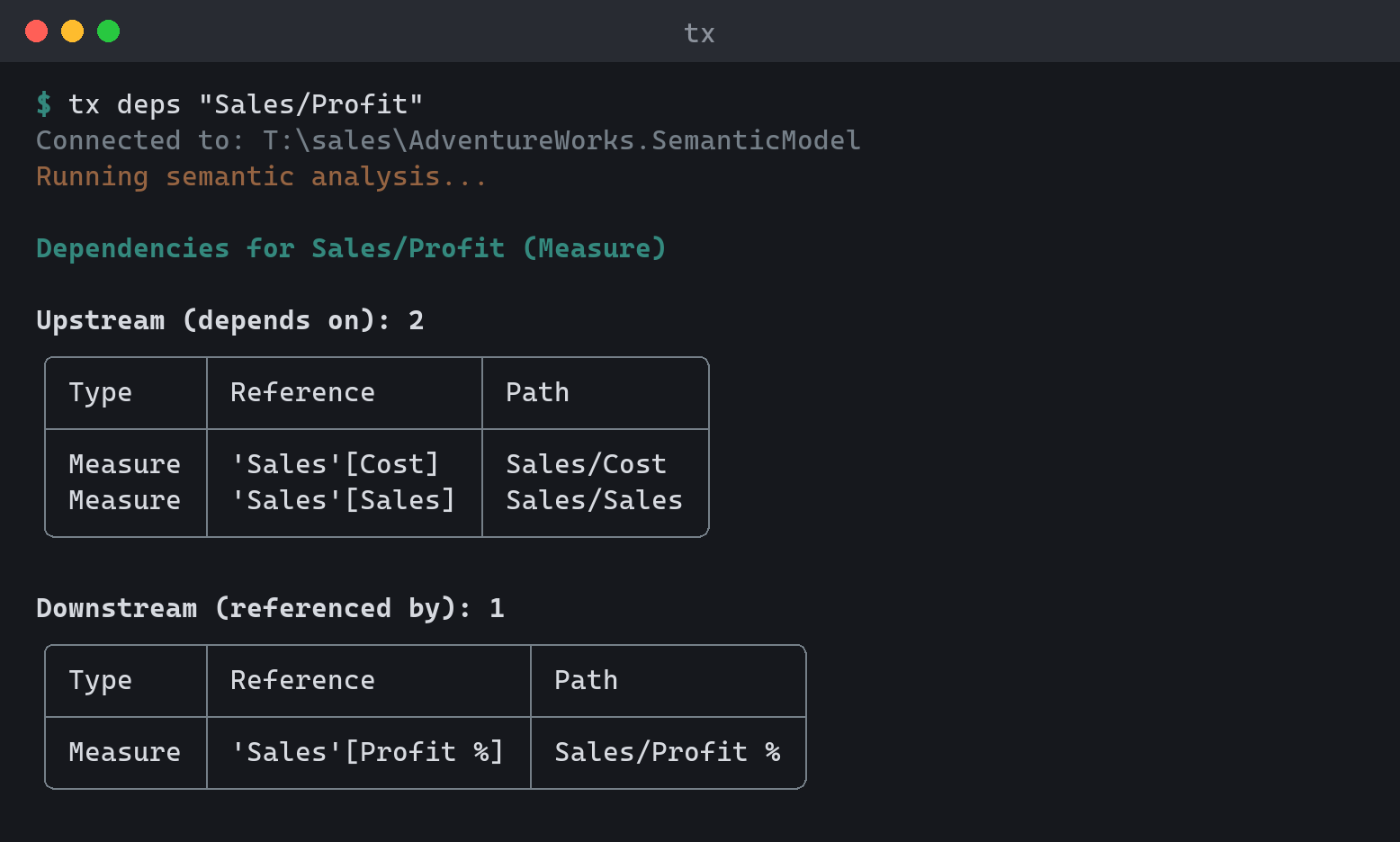
tx deps "Sales/Total Sales" --upstream
tx deps "Sales/Amount" --downstream --deep
tx deps --unused --hidden
query — run DAX or DMV
Executes against a live model (the active remote connection, or
-s/-d). See Output & scripting
for the performance-analysis workflow.
The query text can be passed positionally, via --query, --file (or
piped on stdin) — exactly one of the three. -q is the global --quiet
flag and is never query text; query -q "EVALUATE …" fails with
TOMIX_QUIET_COLLISION naming the mix-up.
| Option | Description |
|---|---|
--query <text> |
Inline query (- = stdin). |
--file <file> |
Read the query from a file (- = stdin). |
--param <name=value> |
Query parameter, referenced as @name in DAX. Repeatable. |
--limit <n> |
Maximum rows to return. |
-o, --output-file <file> |
Write results to a file as json or csv. |
--trace [path] |
Server timings (formula vs storage engine); optional path dumps raw trace events. Needs admin rights. |
--cold |
Clear the model cache (and run a warm-up query) before each run. Needs admin rights. On Power BI / Fabric this empties the query caches but does not evict column data already in memory, so only the first run pays that load cost. |
--runs <n> |
Execute N times and report Avg/Min/Max/StdDev. |
--no-validate |
Skip the EVALUATE/DEFINE/SELECT keyword pre-check. |